
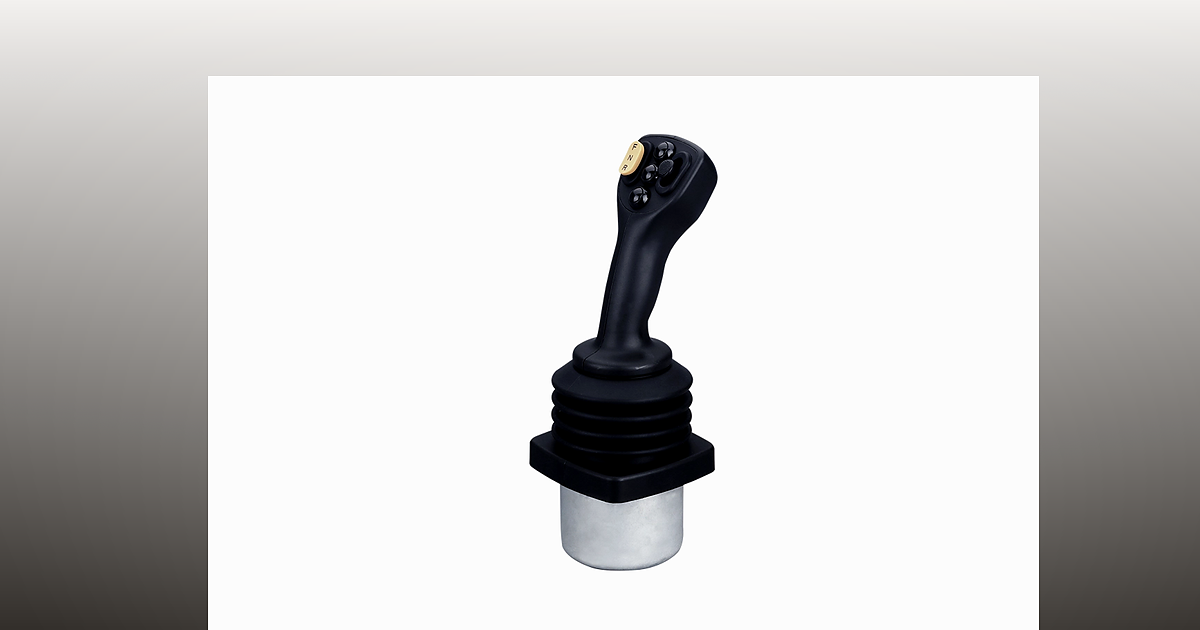
When an OEM engineer searches for CAN bus joystick wiring, they are usually past the marketing brochure stage. The joystick is chosen — often a model such as the Trunsin ZS40 CANbus industrial joystick — and the real work is on the harness: where to terminate, how long stubs can be, and how to avoid J1939 address conflicts that stop the whole network from talking.
This guide explains those physical-layer and addressing questions in plain language. It is written for machine builders, retrofit integrators, and aftermarket teams who already know they need a CANbus industrial joystick but want a checklist before first power-on — not a protocol textbook.
Trunsin supplies electronic joysticks with CAN 2.0, CANopen, and J1939 output options. We do not replace your ECU programming; we help you wire and specify the operator station so commissioning time stays predictable. Use the ZS40 configurator to document axis, grip, and bus options, then share the PDF with your harness shop.
Why CAN bus wiring matters for joystick integration
Unlike a single analog wire per axis, a CAN bus joystick shares one twisted pair with the engine controller, display, I/O modules, and sometimes multiple handles. If termination or stub length is wrong, you may see intermittent faults, “ joystick centering error ” messages on other nodes, or a network that works on the bench but fails in a long cab.
Forum threads on Deere, Komatsu, and Cat machines often mix sensor drift with bus faults. Before replacing a $2,000 controller, verify the harness: grounds, shield termination, 120 Ω at the bus ends, and unique J1939 source addresses. Many field trips end with a $20 terminator or a corrected stub — not a new joystick.
CAN bus basics for joystick installers
Controller Area Network (CAN) uses a differential pair (CAN_H and CAN_L). All nodes connect in parallel; messages are broadcast and filtered in software. For machine joysticks:
- Twisted pair required — use cable rated for CAN or industrial bus (specified impedance).
- One logical bus segment — avoid hidden star points unless you use a designed gateway.
- Ground reference — common reference between ECU, joystick, and power supply; isolate per your machine EMC plan.
- Baud rate — 250 kbit/s is common on J1939; 500 kbit/s appears on shorter CANopen segments. Every node must match.
If you are comparing bus control with legacy analog, read our analog vs digital joystick guide first, then return here for harness details.
120 ohm termination — where and why
A CAN segment needs 120 Ω termination at each physical end of the bus. Termination matches the cable impedance and prevents signal reflections that corrupt frames at higher bit rates or on longer runs.
Practical rules:
- Exactly two terminators on a single segment — one at each end, not at every device.
- Many ECUs have switchable termination; some joysticks do not — plan an external resistor at the far end if needed.
- Do not enable termination on a short bench harness with only two devices unless you confirm only two ends exist on the real machine.
- Measure resistance between CAN_H and CAN_L with power off: roughly 60 Ω (two 120 Ω in parallel) indicates both terminators are present.
Murphy and Danfoss application notes (common references in mobile hydraulics) both stress: wrong termination looks like “random” node dropouts under vibration or temperature — exactly the kind of gremlin that sends technicians to the joystick first.
Stub length and topology
Each device connects to the main trunk via a stub (drop). Stubs act as antennas; if they are too long, reflections return to the trunk.
Rule of thumb used across OEM manuals:
- Keep stubs under 1 m (many specs say 0.3–0.5 m for high reliability).
- Place the joystick node close to the main harness backbone running through the cab.
- Avoid routing CAN through slip rings or flex zones without designed cable — treat those as separate segments with a gateway if needed.
On excavator and crane retrofits, the mistake is often a 3 m “convenience” drop from the armrest to a floor-mounted ECU. Shorten the stub, move a junction box, or re-home the trunk along the seat rail.
J1939 source addresses for joystick controllers
SAE J1939 assigns each transmitting node a source address (0–253). Addresses are often fixed in the device or selected with DIP switches / configuration tool. If two nodes claim the same address, one may stop transmitting or the network may reject traffic — symptoms look like “everything works except the joystick.”
Commissioning checklist:
- Obtain the address map from the ECU supplier before pinning the harness.
- Record each node: engine ECU, transmission, joystick, display, telematics.
- Assign the joystick an unused address; document it in the machine book.
- After power-on, use your service tool to confirm the joystick PGNs appear without “address claim conflict” events.
J1939 is common on construction and agriculture OEM programs. CANopen uses node IDs and EDS files instead — see our planned integration note on the ZS40 product page and contact engineering for EDS availability on your build.
Shielding, connectors, and environmental sealing
Industrial cabs are harsh: water ingress, engine noise, and operator abuse. For CANbus industrial joystick harnesses:
- Follow the connector pinout on the Trunsin drawing — do not swap CAN_H/CAN_L.
- Terminate shield at one end only unless your EMC plan says otherwise (usually at the ECU end).
- Keep CAN away from high-current solenoid wiring in the same bundle.
- Match IP rating at the connector — a sealed joystick with a leaky Deutsch stub defeats the point.
The ZS40 supports Hall sensing, PWM, and multiple bus protocols — wiring discipline matters as much as protocol choice. Compare with hydraulic vs electronic control paths if your retrofit still has pilot-oil plumbing elsewhere in the cab.
Commissioning workflow (first power-on)
- Visual — pinout, ground, no shorts between CAN_H/CAN_L and battery.
- Resistance check — ~60 Ω between CAN_H and CAN_L (power off, terminators as designed).
- Power on — confirm joystick LED or heartbeat if applicable.
- Bus scan — see joystick frames / J1939 PGNs or CANopen heartbeat.
- Functional — center detent, full travel, no fault codes when hands off.
- Record — save address map and harness revision in the machine file.
If the ECU reports a centering error while analog inputs look stable, split the problem: bus layer (this article) vs sensor drift (analog vs digital sensing).
How Trunsin supports ZS40 CAN programs
The ZS40 is aimed at construction and mobile OEM teams moving to networked cabs. Typical configuration includes multi-axis gates, Hall or potentiometer outputs, and CAN 2.0 / J1939 / CANopen groups selectable in the online configurator.
Trunsin engineering can review your address map, stub layout sketch, and ECU documentation before you cut production harnesses — reducing the email loop that delays many first-article builds.
Frequently asked questions
Do I need termination at the joystick?
Only if the joystick is at a physical end of the bus segment and your harness design assigns termination there. Most cabs terminate at the ECU and the far end of the trunk — not at every operator device.
Can I use the same CAN pair for J1939 and CANopen?
No — different protocols on one segment require a gateway or a single chosen stack. Pick the protocol your ECU expects; the ZS40 is configured accordingly at the factory.
What stub length is safe for a crane cab?
Target 0.5 m or less from the main trunk to the joystick connector. Longer drops should be reviewed with your ECU supplier and cable impedance calculations.
How do I fix a J1939 address conflict?
Change the joystick or competing node to an unused address in the supplier’s allowed range, power-cycle, and verify with a scan tool. Document the final map in the machine manual.
Where does Trunsin fit vs elobau or Caldaro CAN joysticks?
Trunsin focuses on factory-direct customization, Configure-to-PDF workflows, and engineering response for OEM quantities — including ZS40 programs that need J1939 or CANopen on multi-axis handles. We welcome harness drawings for review.
Next steps
- Download a ZS40 configuration sheet.
- Mark termination points and stub lengths on your cab harness diagram.
- Email sales@trunsin.com with ECU type, baud rate, and target address map for confirmation.
Need a multi-axis crane handle on analog outputs instead? See the AT16 multi-axis joystick or continue the bus path with ZS40 and this wiring checklist.